Agent Experience
Monitoring & Insights



How to identify website optimization opportunities for AI search
🚧 Scrunch recently shipped major product updates, so some parts of this guide may not match what you see in our platform today. We'll be updating the guide to match, but if you have questions in the meantime, please:
- Ask our in-app AI assistant, Scrunchie.
- Check out our Help Center.
- Reach out to your CSM.
Quick answer
Identify website optimization opportunities for AI search from Scrunch's Site Maps tab.
Website optimization for AI search starts with knowing which pages are working and which aren't. Here's how to find out:
Start in the Site Maps tab for page-level performance metrics:
- Audit Score: Page quality based on content, structure, and links
- Agent Traffic: Number of requests made to the page by AI agents
- Citations: Number of times the page has been cited in AI responses
- AI Referrals: Number of page visits originating from AI platforms
Drill down in the Page Details page for deeper analysis and actions:
- Performance: Platform-specific breakdown of agent traffic, citations, and AI referrals
- Diagnostics: Page-level view of AI agent access, activity, and traditional search indexing status
- Prompts & Responses: Which tracked prompts are or aren't citing this page in AI answers
- Deep AI Audit: Page-level audit results across access controls, content delivery, content quality, and content alignment
- Optimizations: Tools to create and deliver AI-optimized content and history of page optimizations
Track changes over time: Use the date selector (default: last 12 weeks) to monitor how page performance evolves across any time period.
Bottom line: Knowing where to start with website optimization is half the battle—prioritize pages where AI is already showing up but not following through with citations.
Start here
Why you should identify website optimization opportunities for AI search
Website optimization—aka fixing the technical and content issues that prevent AI from reading and recommending your content—is how you turn monitoring into action. If AI bots can't access or understand your content, you won't show up in AI answers. To optimize AI search performance, you need to know which webpages are working, which aren't, why, and where to start.
Here's how to do it using Scrunch.
Before you begin:
- Log in to Scrunch or sign up for a free 7-day trial to follow along.
- Add your brand and website to the AI Context tab in Scrunch, including any alternate domains or subdomains you want to track.
- Customize your brand context in Scrunch (alternative brand names, key competitors, customer personas, key topics, etc.).
- Add prompts to track in the Prompts Monitoring tab in Scrunch (or let Scrunch’s AI generate prompts for you based on your brand or convert a list of SEO keywords into prompts).
- Connect your website to Scrunch’s Agent Traffic feature.
- Connect your Google Analytics account to Scrunch’s AI Referrals feature.
- Make sure your website isn’t blocking Scrunch’s user agent via your CDN or security settings.
Step 1: Map website architecture and view performance metrics in the Site Maps tab
Log in to Scrunch and navigate to the Site Maps tab.
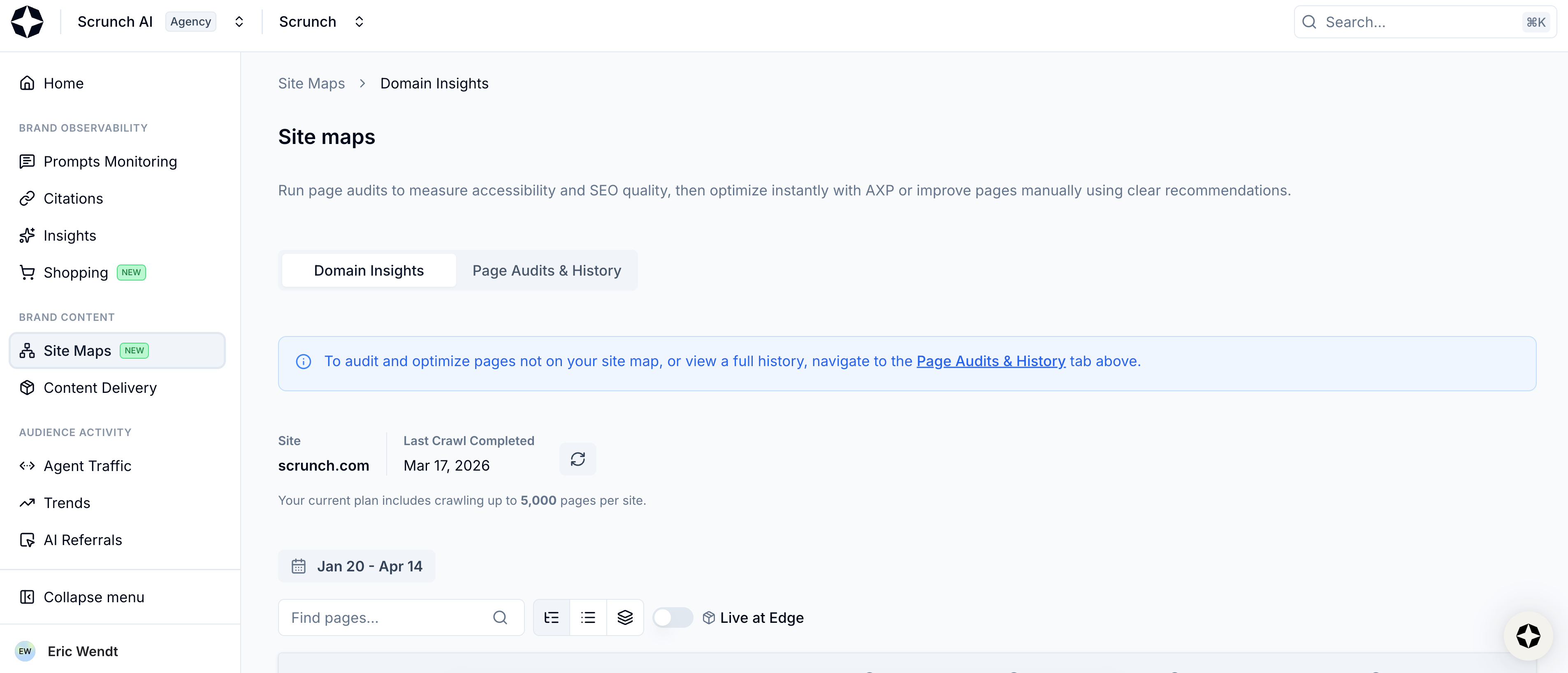
Select Site Maps from left-hand sidebar
This page is your command center for evaluating and optimizing website performance in AI search.
Scrunch automatically crawls your site and maps out webpages and related subpages the way AI user agents see them. Performance metrics for each page are refreshed throughout the day as new data is collected.
At the top of the page you’ll see options for Domain Insights and Page Audits & History.

View Domain Insights and Page Audits & History
We’ll focus on Domain Insights in this guide and cover auditing in a separate guide.
Scroll down the page and you’ll find a table featuring every mapped page on your website. The number of pages you can map is dependent on your plan level.
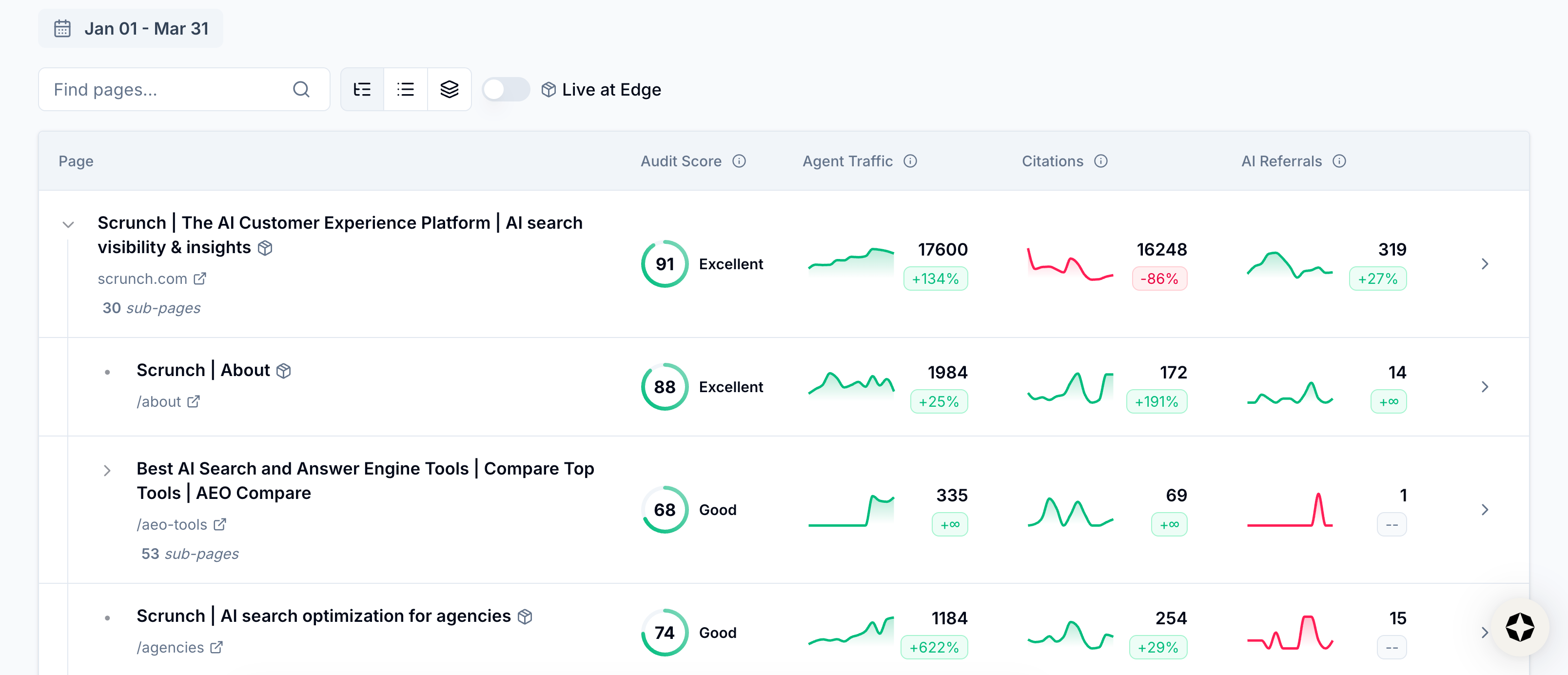
View mapped pages
The table is displayed in a hierarchical view based on your website structure, but you can change the view using the buttons directly above the table. This includes the ability to display pages in a view sortable by specific metrics or rolled up under certain page types.
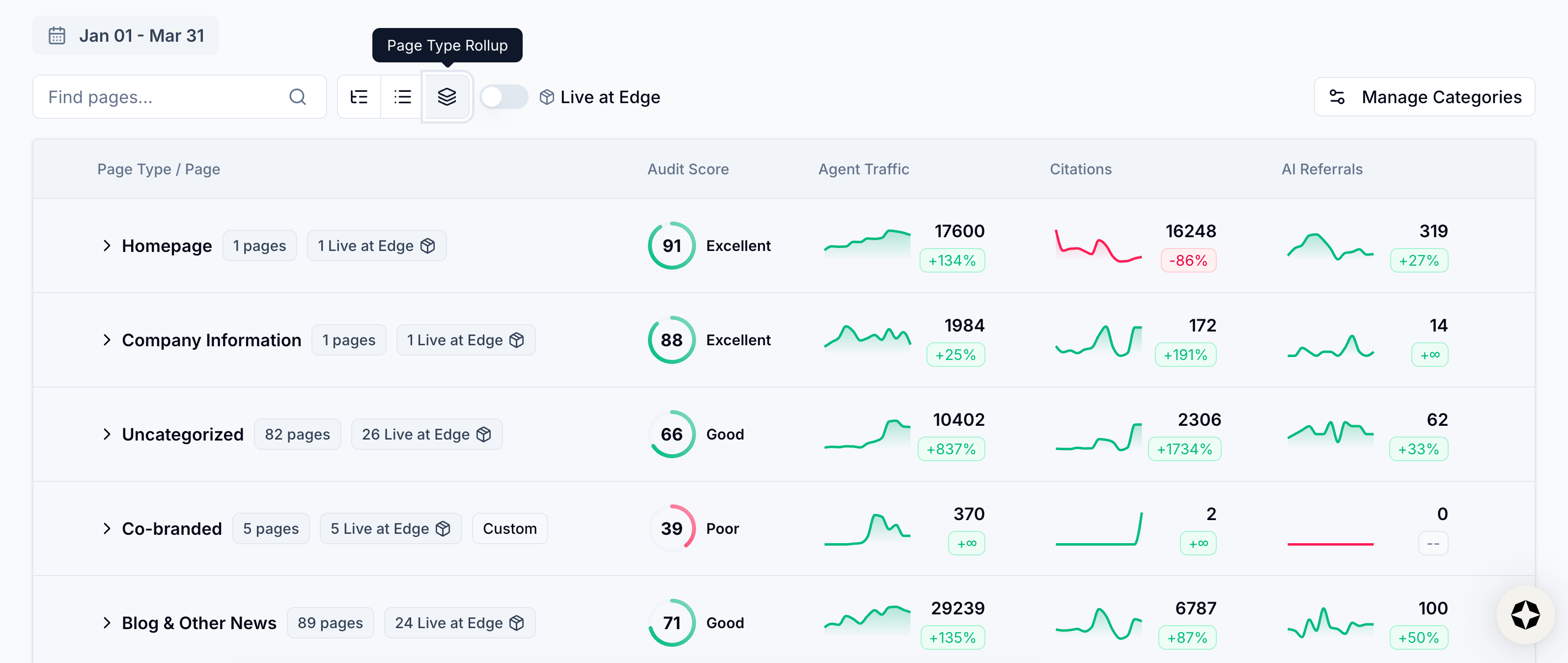
View Page Type Rollup view
You can also use the search bar above the table to locate specific pages.
In addition to page title and URL path, the table shows you:
- Audit Score: Page quality based on content, structure, and links
- Agent Traffic: The number of requests made to the page by AI agents
- Citations: The number of times the page has been cited in AI responses
- AI Referrals: The number of page visits originating from AI platforms
You can see page performance over time by using the date selector at the top of the table (it’s set to the last 12 weeks by default).
Click the date selector button to view your options or set a custom date range.
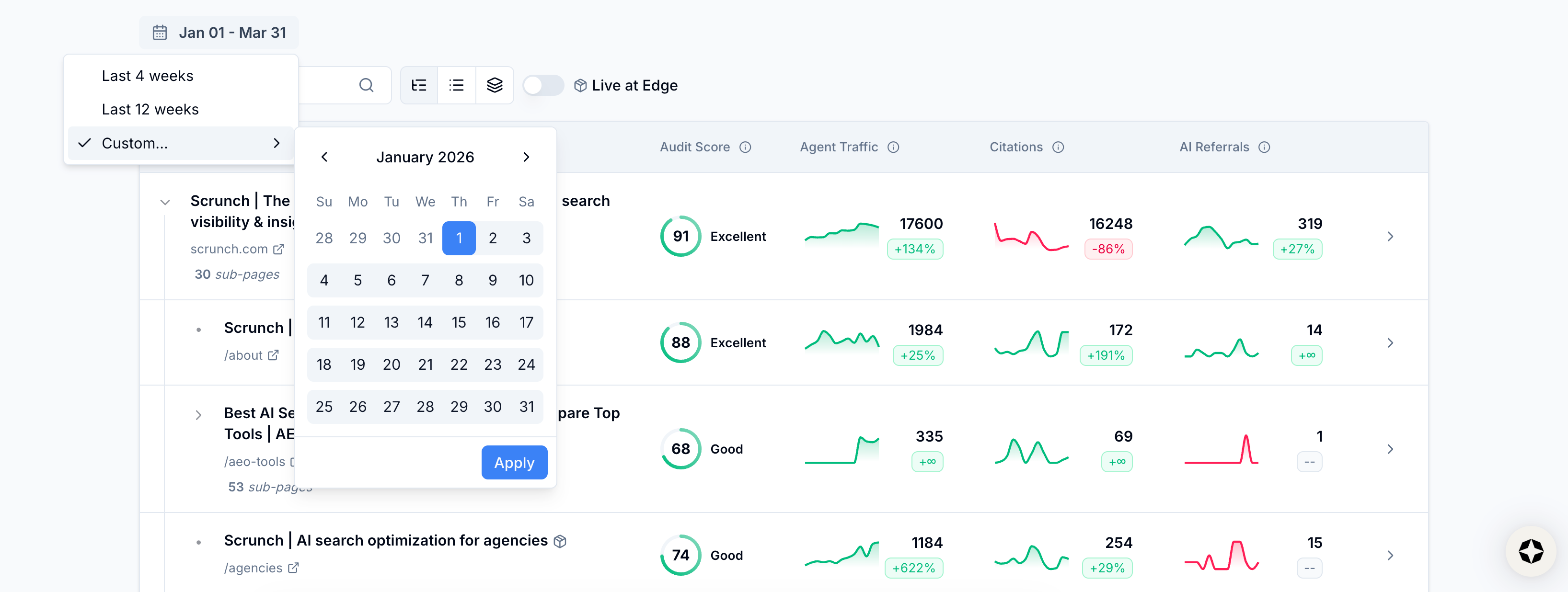
View date options
This data makes it easy to quickly assess site-wide AI visibility health and identify high-impact optimization opportunities minus manual analysis.
Use it to explore your website structure and prioritize pages in need of review.
💡 Pro tip: Besides low Audit Scores, pages with high AI agent traffic but low citations are prime candidates for further investigation and optimization.
Once you spot priority pages, it’s time to drill down to see detailed performance, run page-level audits, optimize content, and improve content delivery.
Step 2: Explore performance and take actions in Page Details pages
Click into a page to open its Page Details page.
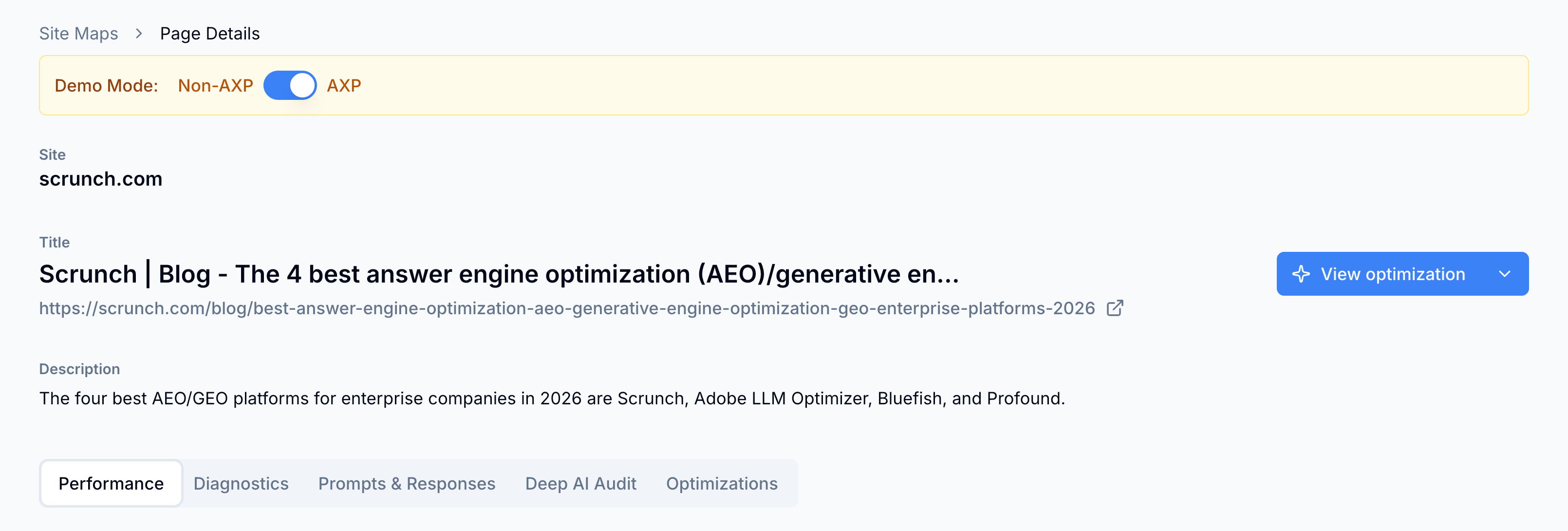
View Page Details page
At the top of the page you’ll see options for:
- Performance: Platform-specific breakdown of AI agent traffic, citations, and AI referrals
- Diagnostics: Page-level breakdown of AI agent access, activity, and traditional search indexing
- Prompts & Responses: The most relevant prompts this page is or should be showing up for in AI answers
- Deep AI Audit: Page-level audit results across access controls, content delivery, content quality, and content alignment
- Optimizations: Content optimization tools and history of page optimizations
You’ll automatically land in the Performance section. This shows you how this page stacks up across different AI platforms for Agent Traffic, Citations, and AI Referrals.
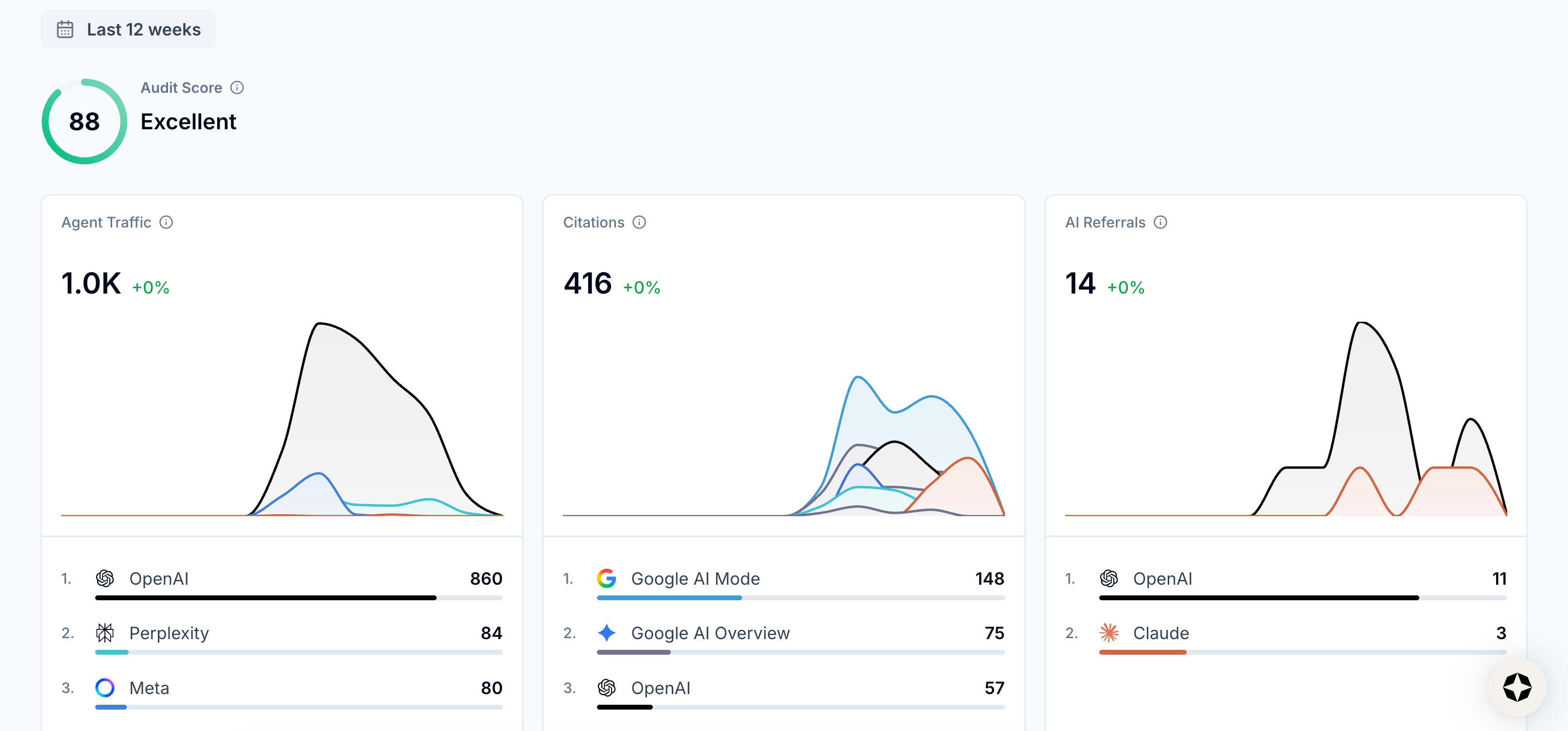
View Agent Traffic, Citations, and AI Referrals
Navigate to the Diagnostics section.
At the top of the page, you’ll see:
- Access Checks: Which AI agents are or aren’t allowed to crawl the page
- AI Agent Activity: Which AI agents are most active on the page and recent crawls
- Search Index Status: Whether the page is or isn’t indexed by traditional search engines

View Access Checks, AI Agent Activity, and Search Index Status
💡 Pro tip: Unless the content on your site is monetized, Scrunch recommends giving AI bots access to your site. The more that LLMs know about your brand, products, and services, the likelier it is that they’ll represent them accurately in AI responses.
Farther down you’ll see a visual rendering of what humans see when they visit the page versus the text content that AI agents see when they visit the page.
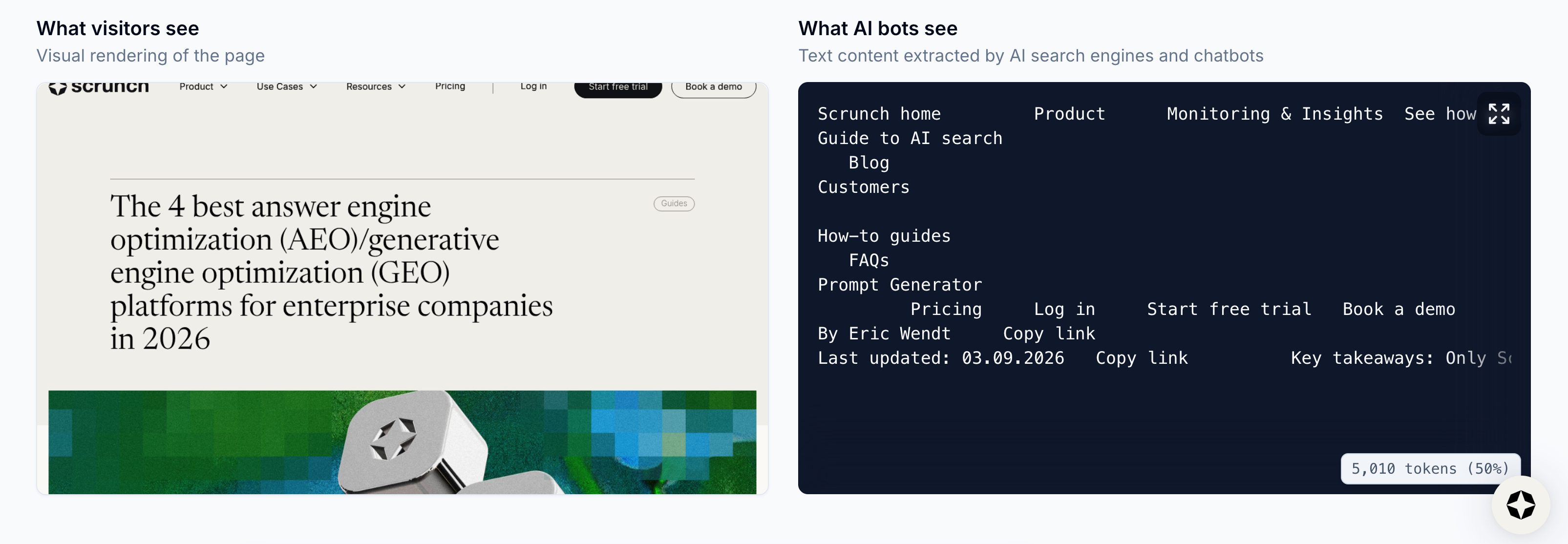
View What visitors see and What AI bots see
Navigate to the Prompts & Responses section.
This section surfaces tracked prompts that have recently generated AI responses that cited this page, as well as prompts that have not resulted in AI citations for this page but should.
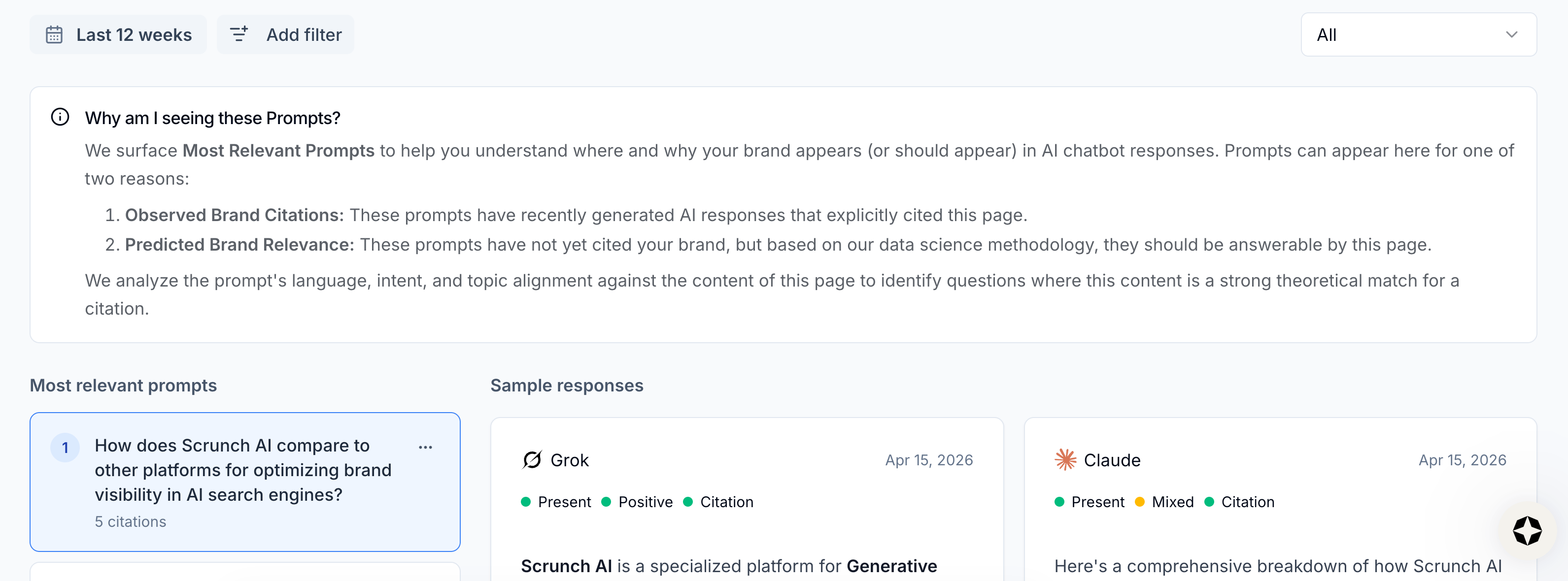
View prompts
You can filter the prompts based on which ones currently cite or don’t cite the page using the dropdown menu in the top right corner.
You can also filter prompts based on topic, persona, and whether they’re branded versus non-branded.
💡 Pro tip: Scrunch recommends prioritizing high-intent, non-branded prompts that represent core product categories and audience demand. Identify and fill content gaps by updating or creating content that exceeds the quality of content currently being cited as a source by AI platforms.
Click the “Add filter” button at the top of the page to view your filter options.
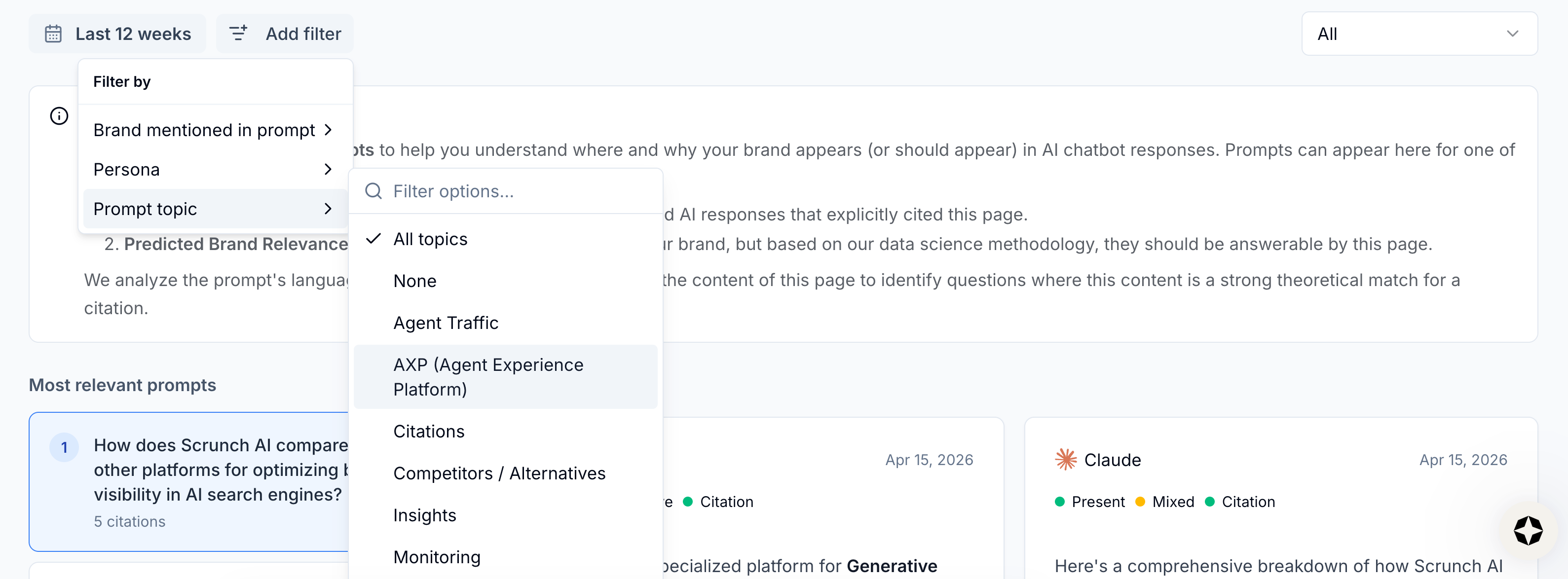
View filter options
You can navigate to the prompts on this page in the Prompts Monitoring tab at any time for a deeper dive.
Navigate to the Deep AI Audit section.
We cover page auditing in a separate guide here, but at a high level, you can run an audit of the page to see:
- Access Controls: Whether your website is configured to allow AI bots to access the page
- Content Delivery: Whether your content is delivered with the necessary technical hygiene and speed
- Content Quality: Whether your content is complete and in a format optimized for AI bots
- Content Alignment: Whether your content aligns with your target prompts
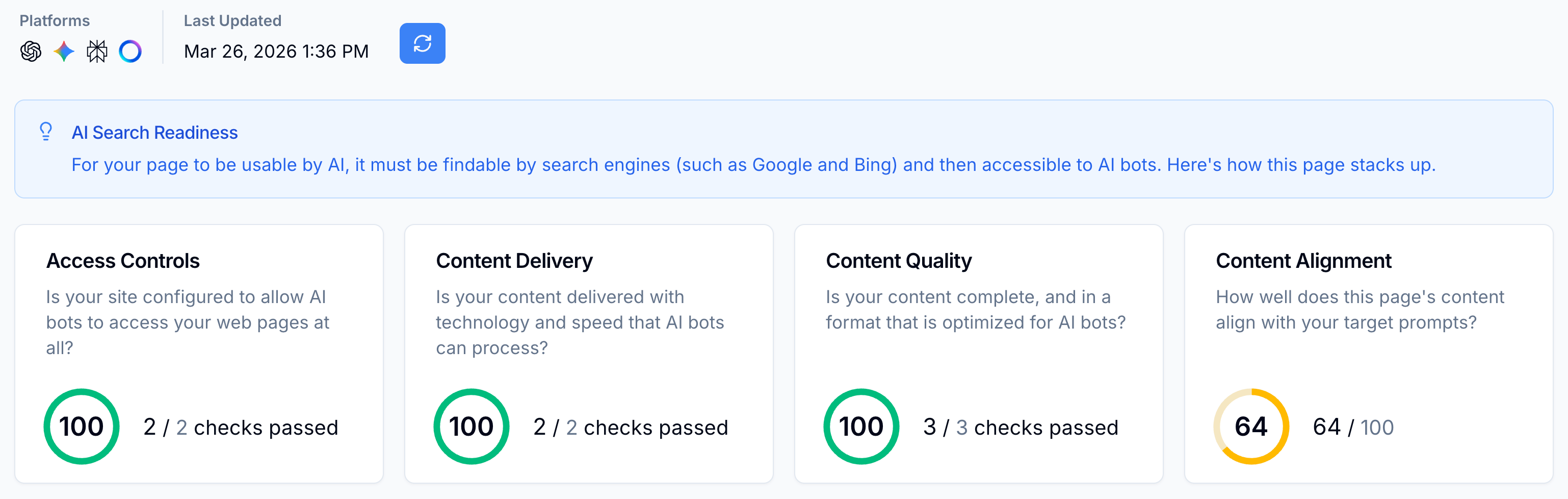
View audit results
This shows you exactly what's working and what needs improvement, complete with specific, actionable insights about AI bot accessibility, technical problems, and content issues.
All audited pages can be found in Page Audits & History.
Once a page is audited, it can then be optimized via Scrunch’s Optimizer feature.
Navigate to the Optimizations section.
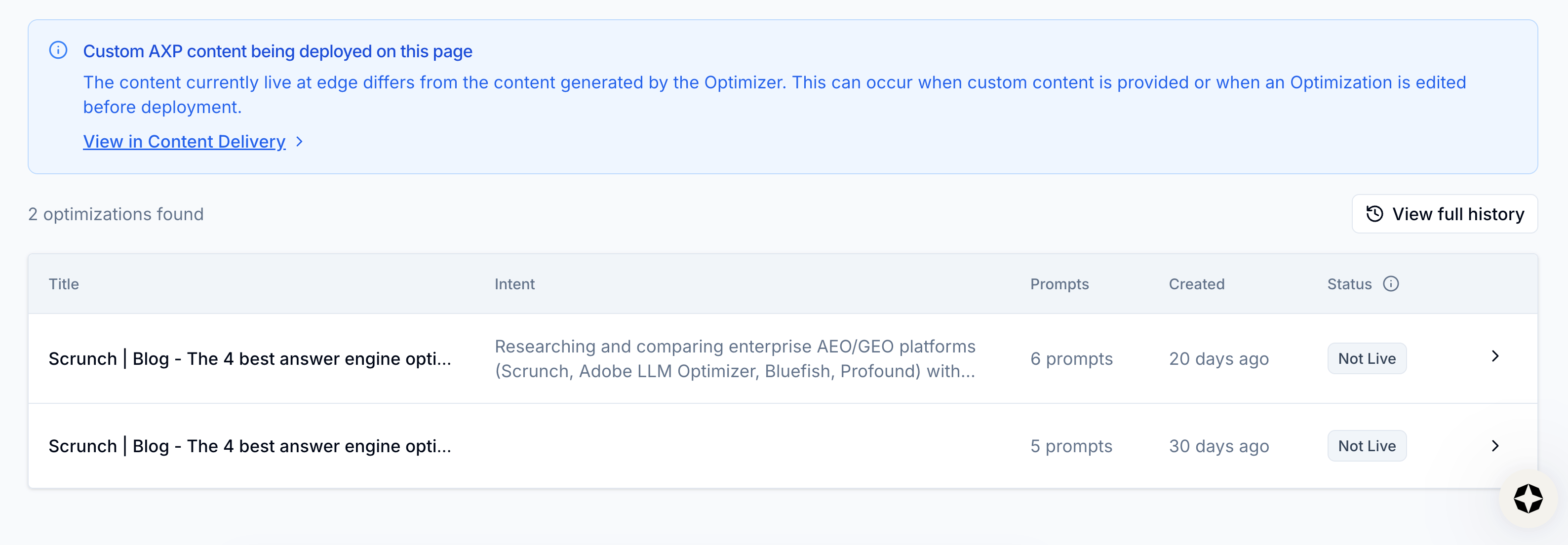
View optimization history
We cover content optimization in a separate guide here, but at a high level, you can run the page through Scrunch’s Optimizer feature to create an AI-optimized version of page content and deliver it directly to AI agents via Scrunch’s Agent Experience Platform (AXP).
If you’re not using AXP, Scrunch will generate actionable content suggestions to improve your existing webpages. Each suggestion includes the issue and the recommended fix so you can improve your canonical, human-facing pages to make them clearer for both humans and AI.
You can view the optimized version of a page, create a new optimized version, and see the full history of page optimizations in this section.
All together you have everything you need to prioritize pages for optimization, audit them, optimize them, and deliver them to AI agents.
From here, you can track performance metrics over time as you implement changes and see how updates to individual pages impact overall AI search results.
What’s next
Start optimizing your website:
- Run a site audit: Fix access, delivery, or content issues hurting your visibility.
- Prioritize technical updates: Make sure AI bots can access and read website content before focusing on content updates or creation.
- Update or create content: Review competitive sources and update or create content to exceed content quality.
- Serve AI-optimized content directly to LLMs: Deliver clean, structured, LLM-optimized page content to AI bots minus any superfluous code or other issues that may hinder AI consumption.
Identifying and prioritizing the webpages most in need of updates—then auditing them, optimizing them, and improving how they’re delivered to AI agents—helps you systematically improve AI search performance across your website.
Scrunch recommends monitoring how your performance improves over time by tracking brand presence, citations, AI agent traffic, and AI referral traffic.
Not a Scrunch customer yet? Start your 7-day free trial or request a demo to see Scrunch in action.